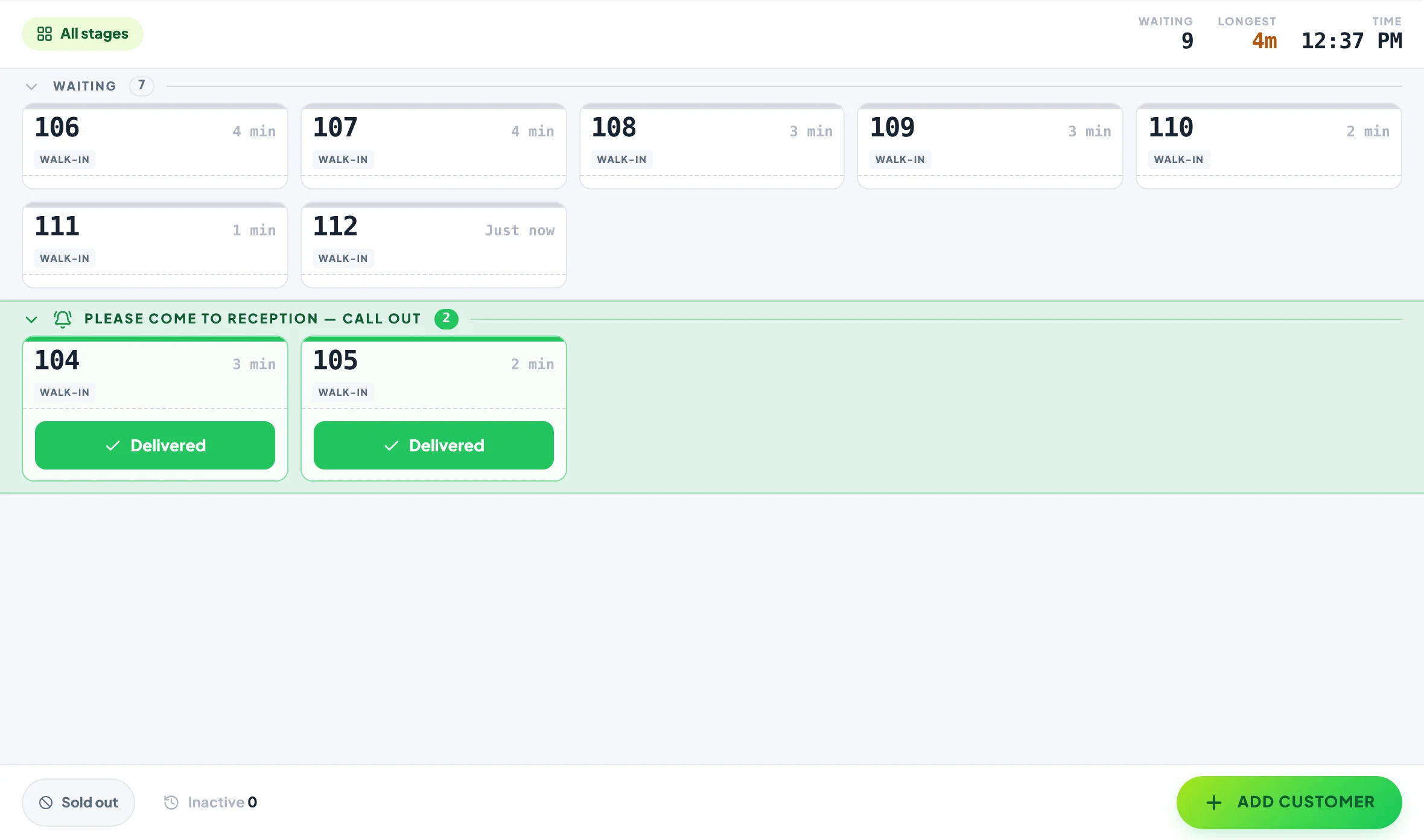
The patient queue management system that calls by number, not by name.
For clinics and medical centres: each patient gets a ticket number at reception, a display in your waiting room shows who is next, and patients can follow their place in line on their own phone.
Free plan, no card needed. Runs on the TV and computers you already have.
The waiting room
Calling a full name across a waiting room tells everyone who is there.
Patients sit within earshot of reception so they don’t miss their turn, ask how long is left, and hear every other patient’s name called. A numbered queue on a screen keeps names private and lets people wait somewhere more comfortable: outside, in the car or at the café next door.
Calling names vs a Now Serving board
Same queue, quieter and more private.
Calling names compared with Yernex
Calling names
Yernex
Who is called
A full name, out loud
A ticket number on the screen
Where patients wait
Within earshot of reception
In the room, or anywhere with their ticket on their phone
“How long will I be?”
Asked at the desk
Their place in line on the screen and on their phone
Patient details
Spoken to the room
None needed to follow a ticket
Kit
Reception’s voice
Any TV or monitor with a web browser
Yernex runs the walk-in queue. It isn’t a booking system and doesn’t connect to practice management software, so appointments stay where they are.
How to set it up
Set up before the morning clinic, on hardware you already own.
01
Name your stages
Sign up free and choose the Simple Queue preset, then rename the stages to suit you, for example Waiting, Please come to reception and Seen. Three to six stages.
02
Pair the waiting-room screen
On the TV or monitor’s browser, go to yernex.com/pub and scan the code it shows with your phone. Rename the board’s sections and pick colours that suit your rooms.
03
Give each patient a number
Reception taps Add Customer and the ticket takes the next number of the day. Leave the name empty. The patient can scan the ticket’s QR code to follow it on their phone.
04
Call the next number
Move a ticket on when the patient is wanted. The number moves on the screen, and their phone plays a sound if they’re following it.
What everyone sees
One queue for reception, the waiting room and the patient.
01In the waiting room
Numbers big enough to read from the back row.
The board shows your practice name and a clock, with the numbers being called and the numbers still waiting, in sections you name yourself.
Ticket numbers only. Names are never shown on the board.
Rename the sections, for example “Please come to reception” and “Waiting”.
Choose the colours, and add a banner with your opening hours or a health notice.
Pair a screen in each waiting area; they all show the same queue.
Reception runs the queue, from any computer at the desk.
Add a ticket in two taps and move it along when the patient is called. Pair the treatment-room computers too, so whoever is free can call the next patient.
Runs in the browser on any phone, tablet, laptop or desktop you already have.
Pair more devices by scanning a code: Free includes one extra screen, Pro as many as you like.
Every screen stays in step. If two people tap the same ticket, nobody moves it twice.
Each screen shows the view it needs, so the counter and the back room can each see their own part.
03On the patient’s phone
Wait outside, without losing your place.
Patients who scan their ticket see how many are ahead and get a sound when they are called, so they can step outside or wait in the car.
No app, no account and no personal details.
Tap “Track My Order” to get a notification even after switching to another app.
Optional: the board on the wall works for patients without a smartphone.
Start free
Start free for one clinic. Upgrade for busier days.
Free
$0, no card needed
QR code ordering, order tracking on the customer’s phone and “order ready” alerts. Up to 10 tickets in progress, no time limit. Customers pay a 10c convenience fee on each QR order.
Pro
$7 a month or $60 a year
Paid monthly or yearly. Adds the Now Serving screen in your colours, an Order again button, review and social buttons, and no limit on tickets or devices.
A way to manage the walk-in line at a clinic: each patient gets a number, a waiting-room display shows who is next, and staff call patients by number instead of by name.
Is it suitable for hospitals?
It suits a single walk-in queue, such as a GP clinic, medical centre, pharmacy counter or outpatient desk. It isn’t built for hospital-wide patient flow across departments.
Does the screen show patient names?
No. The Now Serving board shows ticket numbers only. The name on a ticket is optional, and for a medical centre we suggest leaving it empty.
Do patients need to give any details?
No. They scan the ticket’s QR code and follow it in their phone’s browser. No app, no account, no phone number.
Does it connect to our practice management software?
No. Yernex runs the walk-in queue on its own. Reception adds each ticket in a couple of taps.
Can patients join the queue from home?
Not yet. They get their ticket at reception and can follow it from anywhere after that.
Do ticket numbers start again each day?
Yes. The first ticket of each day is 101, and the day changes at midnight in your time zone.
How much does it cost?
The free plan covers up to 10 patients in the queue at a time, with no time limit. Pro removes the limit for $7 a month or $60 a year, and adds the waiting-room screen.