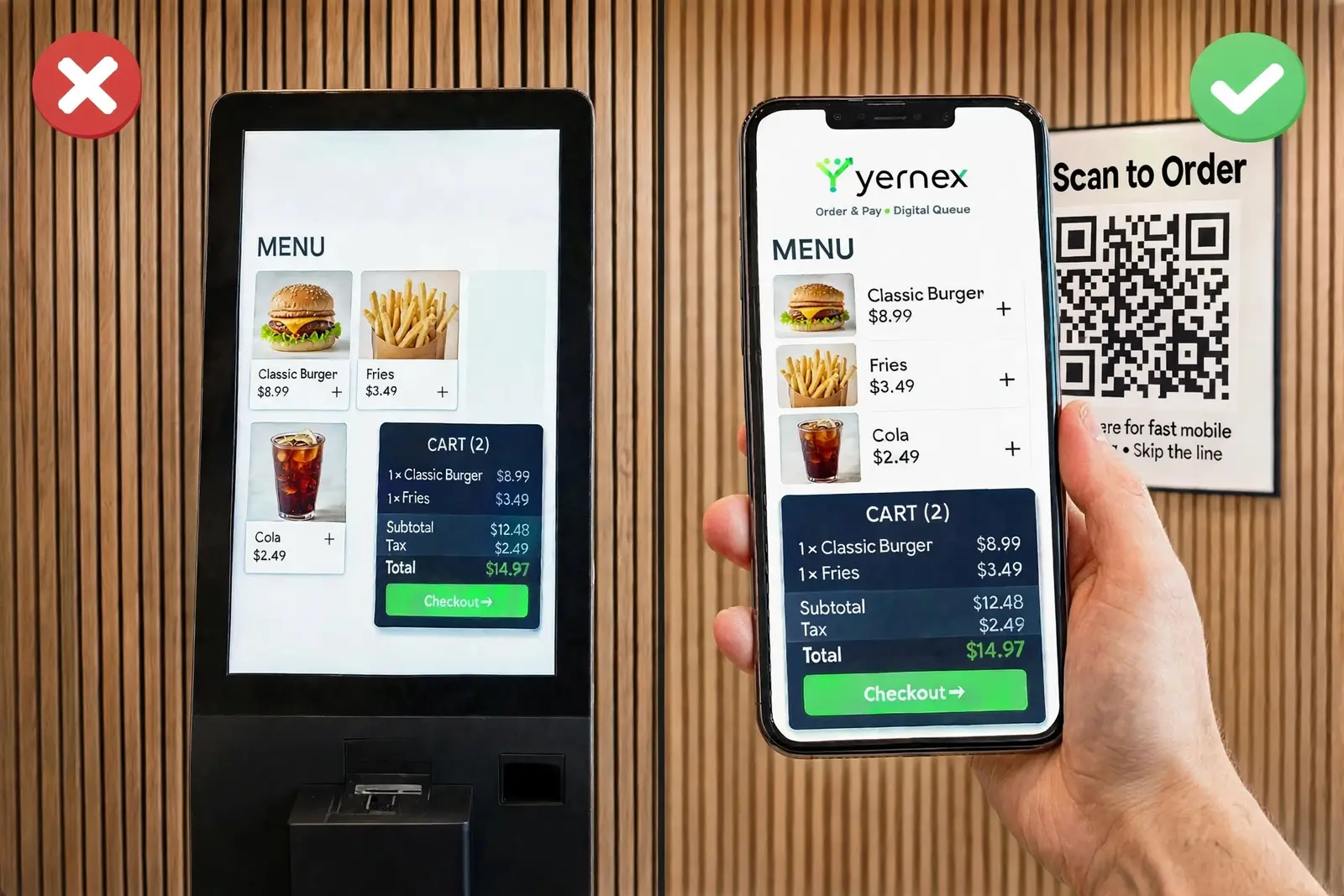
Square QR code ordering: a self-order kiosk on every customer’s phone.
A virtual kiosk with no hardware. Customers scan a QR code, order from your Square menu and pay on their phone. The order lands in your queue with a ticket number, their phone follows it until it’s ready, and one tap orders again next time.
On every plan, including Free. Works with your existing Square account and POS.
Why a virtual kiosk
A kiosk costs thousands and still takes one order at a time.
At the rush, the line to order is the slowest part of your service, and a kiosk just moves it from the register to a screen. A QR code lets everyone order at once from where they stand, from the same Square menu, while your team gets on with making the food.
Kiosk vs virtual kiosk
Same menu, same Square account, no hardware and no line.
Self-order kiosk compared with Yernex
Self-order kiosk
Yernex
Hardware
A kiosk, a stand and a card reader
A printed QR code
Orders at once
One per kiosk
Everyone who scans
Upselling
Depends on the kiosk software
Every order: “Anything else with that?” and “Popular with your order”
Menu and prices
Set up again on the kiosk
Your Square items and prices, kept in sync
Payment
At the kiosk
Card, Apple Pay or Google Pay, through your Square account
After ordering
Wait by the counter and listen
Track the order live; the phone plays a sound when it’s ready
Next visit
Join the line again
An “Order again” button on their tracker
Some customers will always rather order from a person. Keep the register open: QR orders and register orders share one queue and one numbering.
How to set it up
Connect Square once, print a code, take orders.
01
Connect your Square account
In Settings, connect Square and pick your location. Yernex reads your items, options and prices, and your register sales become tickets too.
02
Turn on QR ordering and print your codes
Switch it on in Settings, then make a QR code for each window, table or stall and put it where customers can scan. The upsell step is on from the start.
03
They order and pay on their phone
Your menu opens in their browser with the current wait. They pay by card, Apple Pay or Google Pay through your Square account.
04
Add an “Order again” button
In Settings → Links, add a link to your QR menu and show it on the tracker when an order is ready or collected. Next time is one tap.
What everyone sees
From the first scan to the next order.
01On their phone
An order-taker that never forgets to upsell.
Before they pay, customers are asked “Anything else with that?” and shown what is “Popular with your order”, each one tap to add. Bigger orders, without a sales pitch from your team.
Your Square items, options and prices.
Mark an item sold out from your dashboard and it leaves the menu at once. It comes back on its own within 12 hours.
Items sold out in Square are hidden too.
Shows the current wait and how many orders are ahead before they order.
02Service Board
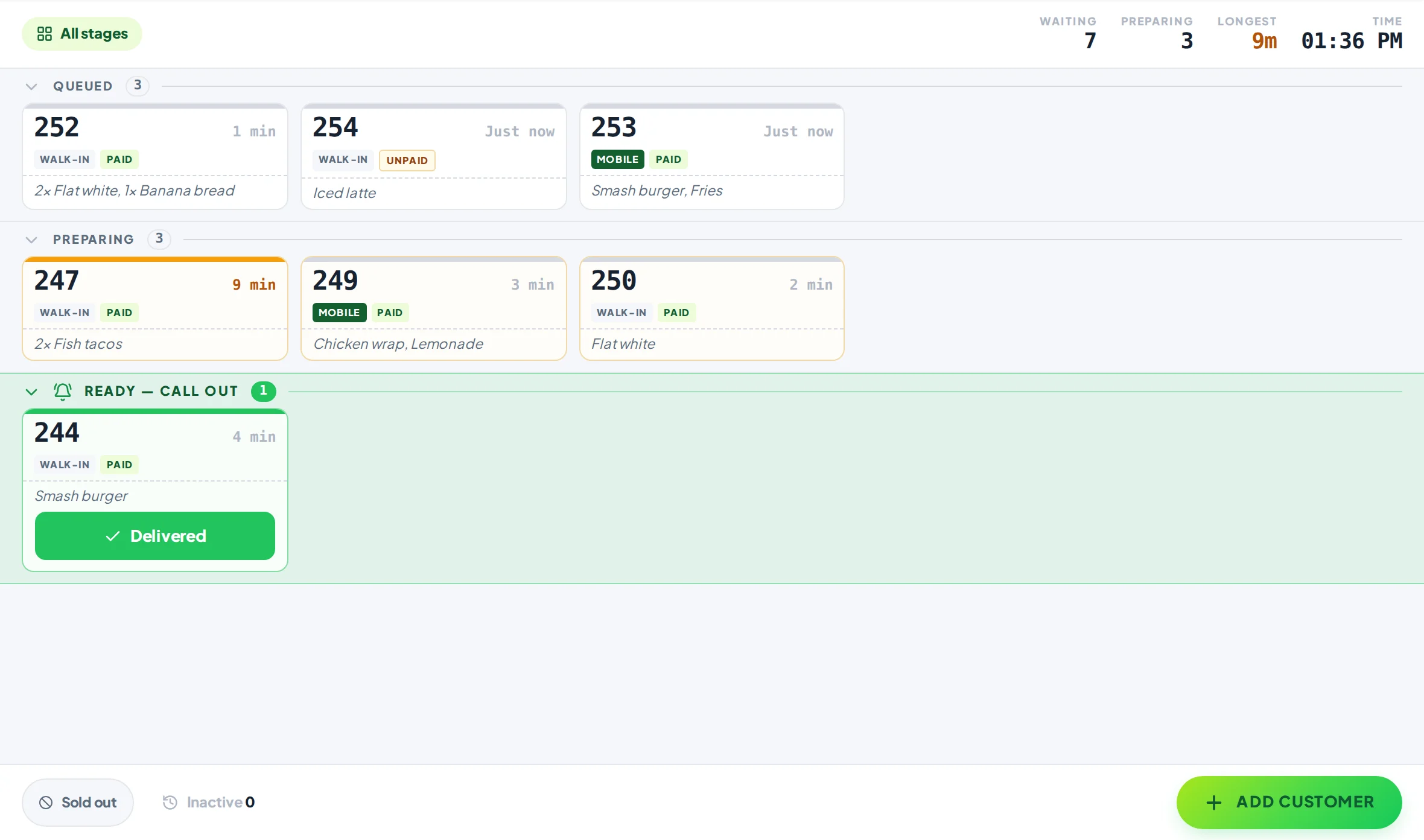
QR orders join your queue, not a second screen.
Paid QR orders, register sales and walk-in tickets all arrive on the same Service Board, numbered from the same sequence, with every item and option on the ticket.
Runs in the browser on any phone, tablet, laptop or desktop you already have.
Pair more devices by scanning a code: Free includes one extra screen, Pro as many as you like.
Every screen stays in step. If two people tap the same ticket, nobody moves it twice.
Each screen shows the view it needs, so the counter and the back room can each see their own part.
03After the order
The next order is one tap away.
The tracker that tells them their order is ready can also bring them back. Add an “Order again” button that opens your QR menu, beside your Instagram, Facebook and Google review page.
Up to 4 buttons per stage on Pro, at the stages you choose.
Pro also shows how many customers tapped each one.
Their phone plays a sound when the order is ready, wherever they are.
QR ordering is free for your shop. Pro is $7 a month or $60 a year.
Free
$0, no card needed
QR code ordering, order tracking on the customer’s phone and “order ready” alerts. Up to 10 tickets in progress, no time limit. Customers pay a 10c convenience fee on each QR order.
Pro
$7 a month or $60 a year
Paid monthly or yearly. Adds the Now Serving screen in your colours, an Order again button, review and social buttons, and no limit on tickets or devices.
Customers scan a QR code, order from your Square menu on their own phone and pay through your Square account. With Yernex, the order then lands in your queue with a ticket number, and the customer tracks it until it’s ready.
What is a virtual kiosk?
A self-order kiosk without the hardware. Customers scan a QR code and order and pay on their own phone, from your Square menu, and the order lands in your queue.
Does it work with my existing Square account and POS?
Yes. Yernex reads your items, options and prices from Square, payments go through your own Square account, and sales show in your Square reports. Your register keeps working as it does now.
What about other POS systems?
Square is the only POS Yernex connects to today. Other POS systems are in the works. Without Square you can still run the queue, the Now Serving board and mobile order tracking.
Is there a fee per order?
Not for your shop. Customers pay a 10c convenience fee on each QR order, shown as its own line before they pay. Orders at your register have no fee. Square’s usual card processing fee applies as it does to any card payment.
How does “Order again” work?
Add a link to your QR ordering menu in Settings → Links and choose which stages show it. It appears as a button on the customer’s order tracker.
What happens when we run out of something?
Mark it sold out from your dashboard and it leaves the menu straight away. It comes back on its own within 12 hours. Items sold out in Square are hidden too.
Does it work for QR code table ordering?
Customers can scan and order from their table, but Yernex is built for pickup: their phone tells them when the order is ready to collect. It doesn’t yet tell your team which table to bring it to.
Which plan includes QR ordering?
Every plan, including Free. Square integration for register orders is free too. Pro adds the Order again button, the Now Serving screen and review buttons, for $7 a month or $60 a year.