Still yelling order numbers? QR code ordering for food trucks, set up for market day
· 10 min read · The Yernex team

If you run a food truck, you know how a busy night goes. Someone orders four burgers, gives you a name and wanders off to find their mates. Ten minutes later you're hanging out the window yelling "Jess!" over the generator, and two people called Jess walk up while the real one is still in the toilet queue.
QR code ordering for food trucks fixes the yelling, and it can bring in orders your window never would. This post covers how it works at a truck, why more (and bigger) codes mean more orders, how to set it up before your next market, what to do when the mobile signal drops, and what it costs if you already take payments with Square.
What QR code ordering changes at a food truck
QR ordering gives your truck a second order-taker that fits on a sticker. Customers scan a code on the truck, pick from your menu on their phone and pay with card, Apple Pay or Google Pay. The order lands in your queue with a number, and their phone plays a sound when it's ready.
At a café, the main win is fewer people at the counter. At a truck the bigger win is at the other end of the order. The person who ordered can sit on the grass with their mates, and their phone calls them back. Nobody has to hear their name over a generator, a band and a crowd.
It won't make your grill any faster. If you can cook 60 burgers an hour, QR ordering doesn't change that. What it changes is how long people stand in line before you even start cooking, and how many orders get collected cold because the customer missed the call.
The window stays open too. Plenty of people still want to talk to you, pay with cash, or ask whether the chilli sauce is actually hot. QR ordering runs beside the window and takes the people who'd rather not wait in line.
More codes, bigger codes, more orders
Every QR code you put out is another spot someone can order from, and this is where trucks leave the most money on the table. If your only code is taped beside the window, people still walk over and line up to use it. You've moved the queue onto their phones, but your customers are the same people who would have ordered anyway.
Spread the codes out and make them big, and you start taking orders from people who aren't standing anywhere near your truck:
- Someone waiting in the line at the dumpling truck next door spots your sign, orders loaded fries to go with their dumplings, and picks up both without lining up twice.
- A group on a picnic rug in front of the stage orders a second round without anyone giving up their spot or missing the headliner.
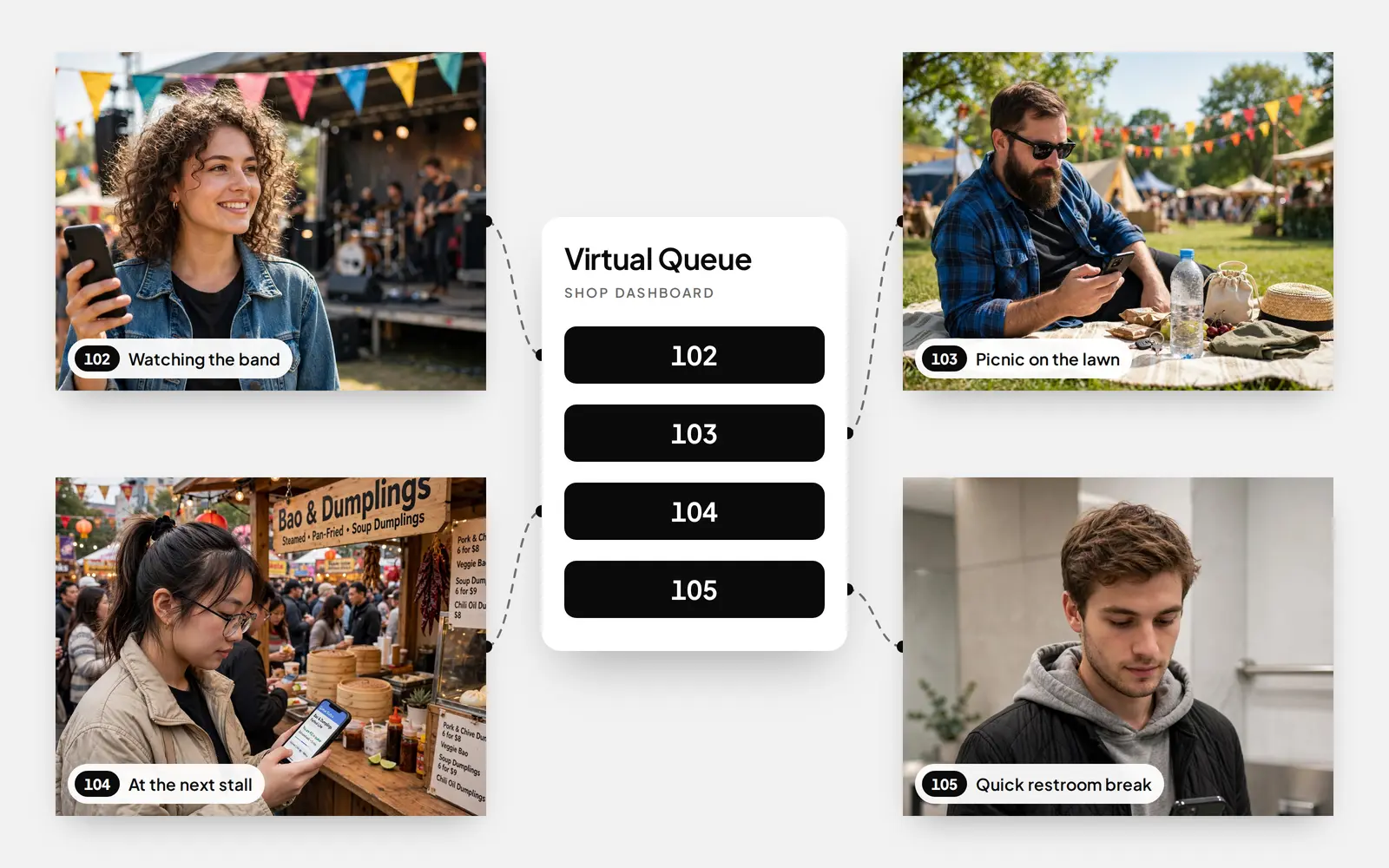
Neither of those orders would happen at the window. The same goes for the family who saw your 20-person line and kept walking. With a code on their table, the line doesn't matter to them any more. They order, pay with Apple Pay, and wait for their phone to tell them it's ready.
Size decides how far away someone can order from. QR printing guides use a 10:1 rule of thumb: a code scans from about 10 times its own width. A 5 cm code on the counter works from arm's length. A code you want people to scan from across the walkway needs to be poster-sized. As a starting point:
- On the counter or window ledge, scanned from about 50 cm: at least 5 cm wide.
- On shared tables near your truck, about 1 m away: at least 10 cm.
- On an A-frame where the line starts, about 1.5 m away: at least 15 cm.
- On a banner on the side of the truck, about 3 m away: at least 30 cm.
- On a sign facing the walkway or the stage, about 5 m away: at least 50 cm.
Go bigger than that outdoors. Glare, wind and dim festoon lighting all make scanning harder, and the same sizing guide suggests adding 25 to 50% for signs outside. A big code also works as advertising: people see "Scan to order" from 5 metres away before they've decided what to eat.
Check with the organiser before you put codes on shared tables or near the stage. Some markets are happy with it, and others want codes on your own signage only.
Before market day: setting up QR ordering on your truck
Most of the work happens at home the night before. Once it's done, setting up at a new site takes about as long as sticking up a menu.
- Connect Square and pick your location. Yernex reads your items, options and prices from Square, so there's no second menu to keep up to date. Sales you ring up at the register show up in the same queue.
- Check the menu you'll actually sell. If your market menu is shorter than your usual one, give the truck its own location in Square. Square's community team suggests the same thing for trucks that use Square Online.
- Print more codes than you think you need. Put them where people are, not only on the truck, and size each one for the distance it'll be scanned from (the list above).
- Make them weatherproof. Laminate the small ones, print the big ones on corflute or a vinyl banner, and tape or tie everything down well. Then scan each one from where a customer will stand, at night, under your own lights.
- Set up your add-ons. The QR menu can suggest an extra with each order, like chips with a burger or a drink with a curry. Pick the one you'd normally try to sell at the window.
- Add your Instagram or Google review link. People have a few minutes to fill while they wait, and a link to your Instagram tells them where you'll be next week.
- Sort out internet for the truck. The device running your queue needs to be online. A phone hotspot is enough, but bring a power bank so it lasts the whole shift.
- Run a test order before the gates open. Scan, order, pay, mark it ready and check the phone plays its sound. Five minutes here saves a lot of confusion at 6pm.
If you're not sure which setup suits your truck, the setup finder asks a few questions and tells you.
On the day: one queue, two ways in
The thing that trips trucks up is ending up with two lines of orders: the dockets from the window and a second pile from phones. Keep it to one queue and the kitchen never has to think about where an order came from.
With Yernex, a paid Square order becomes a ticket automatically, numbered with Square's ticket number. QR orders drop into the same list. For a cash sale, your team adds a ticket in a couple of taps and the customer scans the code on it to follow along. The cook works top to bottom and marks each order Preparing, then Ready.
When you tap Ready, the customer's phone plays a sound and shows where to collect. While they wait, it shows how many orders are ahead of them, so they know whether there's time to grab a drink first.
Running out of something mid-shift is normal at a market. Mark the item sold out and it disappears from the QR menu straight away, so nobody pays for brisket you no longer have. It comes back by itself within 12 hours, ready for your next trading day.
If you have a spare tablet or an old TV, pair it as a Now Serving screen and hang it in the window. It shows Preparing and Ready numbers in big type, which helps the customer whose phone battery died an hour ago.
When the signal drops
Every truck owner has done a festival where the EFTPOS machine sat on "connecting" for half the night. QR ordering needs mobile data too, so plan for it.
Big crowds in a small area slow mobile data down. Telstra says it adds temporary coverage at more than 650 public events across Australia each year, often with portable towers called Cells on Wheels, because the normal network can't carry that load. Smaller markets and car parks don't get that treatment.
Here's what holds up and what doesn't:
- The truck's device needs to be online for the queue to update. A phone hotspot works, and a second SIM on a different network is cheap insurance.
- A customer whose phone loses signal can't see their order move. Their number still shows on your Now Serving screen, and you can call it out the old way.
- If the site has no usable signal at all, take the QR codes down and run the window as normal. Put them back up when the crowd thins and data picks up.
Test the signal when you arrive, before you put the codes out. Check it again at the peak, because 7pm on a Saturday is a different network from 4pm.
What QR code ordering costs a food truck on Square
If you already use Square, you have two ways to add QR ordering: Square's own, through Square Online, or Yernex, which plugs into the Square account you already have.
Square's own QR ordering for in-person orders needs a paid Square Online Plus or Premium plan. Square's Australian pricing page lists Plus from $36 a month, and sales are processed at Square's 2.2% online rate. It's built around ordering stations, like table numbers in a beer garden, where staff carry the food out. That suits a venue with fixed seating. Square can also send order status text messages.
With Yernex QR ordering, your truck pays nothing per order and nothing to Yernex on the Free plan. Customers pay a 10c convenience fee on each QR order, shown as its own line before they pay, and you pay Square's usual card processing fees. It's built for pickup: the customer comes back to the window when their phone plays its sound.
The Free plan has a limit of 10 tickets in progress at once, and it only applies to tickets your team adds by hand, like cash sales. QR orders and Square sales always go through, even on a flat-out Friday night. If you're often past 10 at once, Pro removes the limit and adds your own colours and banners. What it costs is on the pricing page.
For a closer look at what "free" QR ordering usually hides, see what free QR code ordering actually gets you.
When QR ordering isn't worth it
It doesn't suit every truck, and some of these limits are ours.
- You serve in under a minute. A soft-serve van or a batch-brew coffee cart can hand over the order faster than someone can scan and pay. The line is the product there.
- You're not on Square. Yernex QR ordering only connects to Square for now. You can still use our queue and the customer's phone alert for orders taken at the window.
- You walk food out to people. Yernex tells customers to come and collect. It doesn't tell your staff which table to deliver to.
- Your regular sites have no signal. If your best pitch is a country show in a valley, keep the codes in the drawer for those days.
Frequently asked questions
Do customers need to download an app to order from a food truck by QR code?
No. The menu and the order tracker open in the phone's browser after a scan. There's nothing to install and no account to make.
How much does QR code ordering cost a food truck?
On Yernex, QR ordering is included in the Free plan, and your truck pays no fee per order. The customer pays a 10c convenience fee per QR order, and Square's usual card processing applies. Square's own QR ordering needs a paid Square Online plan.
Does it work with the Square POS I already have?
Yes. Your items, options and prices come from Square, payments go through your Square account, and the sales show up in your Square reports.
Can customers pay with Apple Pay or Google Pay?
Yes, as well as by card. Most people at a market already have one of them set up on their phone, which makes checkout a couple of taps.
What if a customer's phone loses signal?
Their order still sits in your queue as normal. They just won't see updates until their signal comes back. If you run a Now Serving screen, their number shows there, and you can always call it out.
How many QR codes should a food truck put out?
More than you'd think. Start with one at the window, an A-frame where the line forms and a large banner on the side of the truck that people can scan from across the walkway. If the organiser allows it, add codes on shared tables and near the stage, where people are happy to order but don't want to give up their spot.
How big should a QR code be on a food truck?
About a tenth of the distance it will be scanned from: 30 cm wide for a banner people scan from 3 metres away. Go 25 to 50% bigger outdoors, where glare and dim light make scanning harder.
Prices, plans and features mentioned in this post were correct at the time of writing and may change without notice. The pricing page always shows what is current.
More from the blog